Get paid to talk.
Get paid to talk.
Get paid to talk.
Record conversations with a friend,
upload the audio, and earn.
Scroll to explore

About
About
About
A simple way to earn from conversations. Your audio helps train AI to better understand real human speech
A simple way to earn from conversations. Your audio helps train AI to better understand real human speech
"We don’t clone your voice or sell your personal information. You stay in control and profit from your own data."
We don’t clone your voice or sell your personal information.
You stay in control and profit from your own data :)

Talk.
Pick a quiet place, chat about anything you want, and each speaker records themselves. No app download.
Talk.
Pick a quiet place, chat about anything you want, and each speaker records themselves. No app download.
Talk.
Pick a quiet place, chat about anything you want, and each speaker records themselves. No app download.
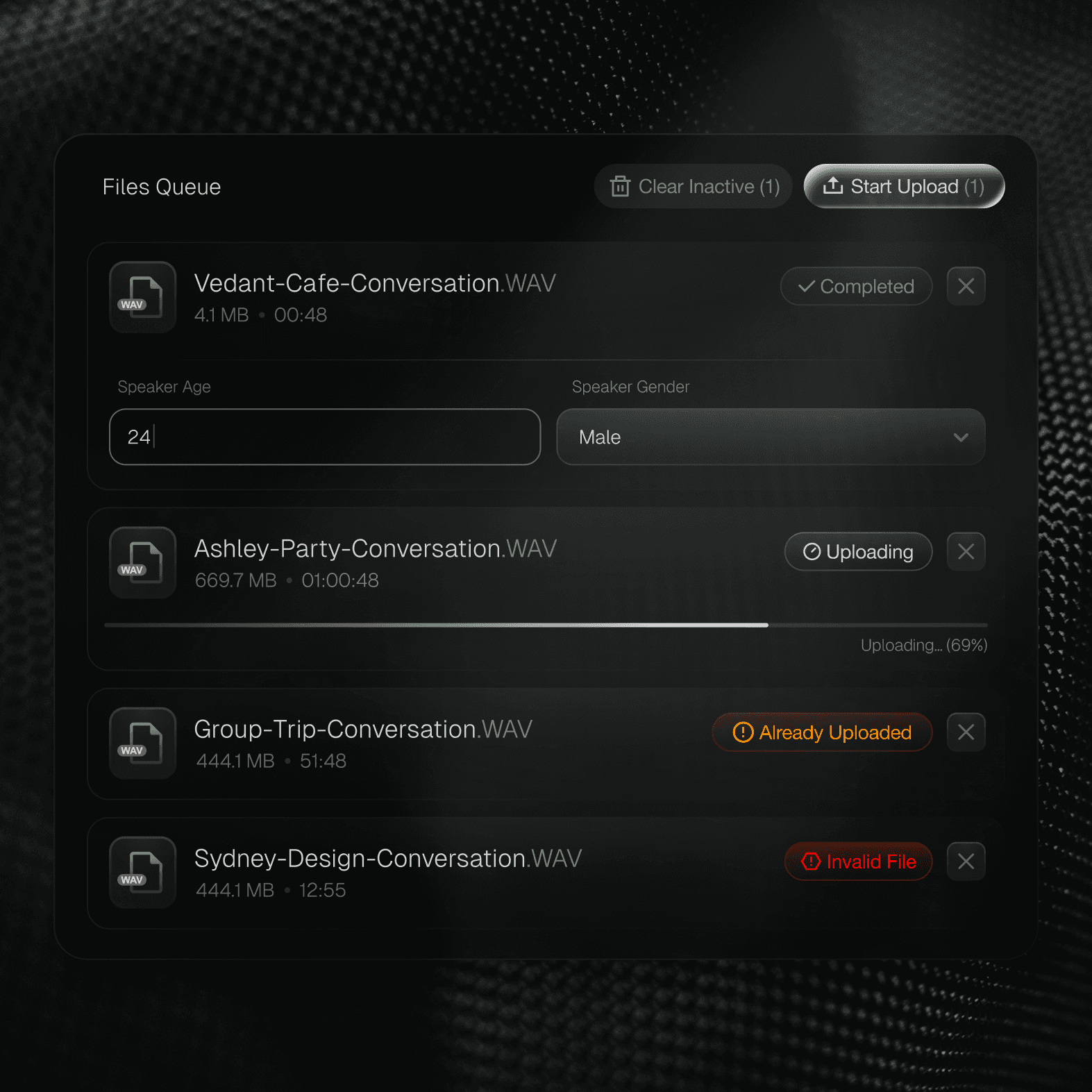
Upload.
Drag and drop your audio files, confirm who’s speaking on each track, and submit. We handle syncing and review.
Upload.
Drag and drop your audio files, confirm who’s speaking on each track, and submit. We handle syncing and review.
Upload.
Drag and drop your audio files, confirm who’s speaking on each track, and submit. We handle syncing and review.

Get Paid.
Once your recordings are approved, you’ll get paid directly to your bank account through Stripe.
Get Paid.
Once your recordings are approved, you’ll get paid directly to your bank account through Stripe.
Get Paid.
Once your recordings are approved, you’ll get paid directly to your bank account through Stripe.
Set Up Gudie
Set Up Gudie
Set Up Gudie
Different paths to explore all guided by one silent companion.
Different paths to explore all guided by one silent companion.
Different paths to explore all guided by one silent companion.
For iPhone Users
Step 1: Go into Settings → Voice Memos → Audio Quality → Lossless
Step 2: Use default Voice Memos app to record
Step3: Record on separate devices and sit a few feet away from each other.
For Android Users
Step 1: Use built-in Recorder app (set to High Quality/WAV)
If unsure, install ASR Voice Recorder App → set WAV (PCM), 48k
Step 2: Record on separate devices and sit a few feet away from each other.

Zoom
Step 1: Download the Desktop App
Step 2: Download the Desktop App
Step 3: Turn on “Record a separate audio file for each participant”
USB Mic
Step 1: Select the mic as the input
Step 2: Keep ~6" from your mouth
Step 3: Avoid touching or bumping the mic
For iPhone Users
Step 1: Go into Settings → Voice Memos → Audio Quality → Lossless
Step 2: Use default Voice Memos app to record
Step3: Record on separate devices and sit a few feet away from each other.
For Android Users
Step 1: Use built-in Recorder app (set to High Quality/WAV)
If unsure, install ASR Voice Recorder App → set WAV (PCM), 48k
Step 2: Record on separate devices and sit a few feet away from each other.
Zoom
Step 1: Download the Desktop App
Step 2: Download the Desktop App
Step 3: Turn on “Record a separate audio file for each participant”
USB Mic
Step 1: Select the mic as the input
Step 2: Keep ~6" from your mouth
Step 3: Avoid touching or bumping the mic
For iPhone Users
Step 1: Go into Settings → Voice Memos → Audio Quality → Lossless
Step 2: Use default Voice Memos app to record
Step3: Record on separate devices and sit a few feet away from each other.
For Android Users
Step 1: Use built-in Recorder app (set to High Quality/WAV)
If unsure, install ASR Voice Recorder App → set WAV (PCM), 48k
Step 2: Record on separate devices and sit a few feet away from each other.
Zoom
Step 1: Download the Desktop App
Step 2: Download the Desktop App
Step 3: Turn on “Record a separate audio file for each participant”
USB Mic
Step 1: Select the mic as the input
Step 2: Keep ~6" from your mouth
Step 3: Avoid touching or bumping the mic
For iPhone Users
Step 1: Go into Settings → Voice Memos → Audio Quality → Lossless
Step 2: Use default Voice Memos app to record
Step3: Record on separate devices and sit a few feet away from each other.
For Android Users
Step 1: Use built-in Recorder app (set to High Quality/WAV)
If unsure, install ASR Voice Recorder App → set WAV (PCM), 48k
Step 2: Record on separate devices and sit a few feet away from each other.
Zoom
Step 1: Download the Desktop App
Step 2: Download the Desktop App
Step 3: Turn on “Record a separate audio file for each participant”
USB Mic
Step 1: Select the mic as the input
Step 2: Keep ~6" from your mouth
Step 3: Avoid touching or bumping the mic
iPhone
Android
Zoom
USB Mic
Step 1
Go into Settings → Voice Memos → Audio Quality → Lossless
Step 2
Use default Voice Memos app to record
Step 3
Record on separate devices and sit a few feet away from each other.
iPhone
Android
Zoom
USB Mic
Step 1
Go into Settings → Voice Memos → Audio Quality → Lossless
Step 2
Use default Voice Memos app to record
Step 3
Record on separate devices and sit a few feet away from each other.
Benefits
Benefits
Benefits
An easy way to earn from conversations. No app download, protected privacy, fast payouts, and the freedom to record from anywhere.
An easy way to earn from conversations. No app download, protected privacy, fast payouts, and the freedom to record from anywhere.
Simple
Talk about everyday topics and record conversation with friends
Simple
Talk about everyday topics and record conversation with friends
Simple
Talk about everyday topics and record conversation with friends
No Equipment Required
Clear instructions for iPhone, Android, or Zoom.
No Equipment Required
Clear instructions for iPhone, Android, or Zoom.
No Equipment Required
Clear instructions for iPhone, Android, or Zoom.
Fast Payouts
Approved hours are paid out quickly and transparently.
Fast Payouts
Approved hours are paid out quickly and transparently.
Fast Payouts
Approved hours are paid out quickly and transparently.
Uncapped earnings
Do a few recordings or take on larger batches.
Uncapped earnings
Do a few recordings or take on larger batches.
Uncapped earnings
Do a few recordings or take on larger batches.
Your privacy protected
Your personal identity is never shared or sold.
Your privacy protected
Your personal identity is never shared or sold.
Your privacy protected
Your personal identity is never shared or sold.
Remote
Record anywhere - in person or over Zoom with someone across the world.
Remote
Record anywhere - in person or over Zoom with someone across the world.
Remote
Record anywhere - in person or over Zoom with someone across the world.
FAQ
FAQ
FAQ
Your questions, answered with clarity
Your questions, answered with clarity
Your questions, answered with clarity
What kind of conversation do I need to record?
Do we need special equipment?
What does “multichannel” mean?
How far apart should we sit?
Can we record remotely?
How much can I earn?
How do I get paid?
Who uses the audio?
Is my voice being cloned?
Is my personal information shared or sold?
Can I choose my conversation partner?
Is there a minimum number of hours?
What kind of conversation do I need to record?
Do we need special equipment?
What does “multichannel” mean?
How far apart should we sit?
Can we record remotely?
How much can I earn?
How do I get paid?
Who uses the audio?
Is my voice being cloned?
Is my personal information shared or sold?
Can I choose my conversation partner?
Is there a minimum number of hours?
What kind of conversation do I need to record?
Do we need special equipment?
What does “multichannel” mean?
How far apart should we sit?
Can we record remotely?
How much can I earn?
How do I get paid?
Who uses the audio?
Is my voice being cloned?
Is my personal information shared or sold?
Can I choose my conversation partner?
Is there a minimum number of hours?
Get Paid to Talk.
Get Paid to Talk.
Get Paid to Talk.
Record conversations with a friend,
upload the audio, and earn.